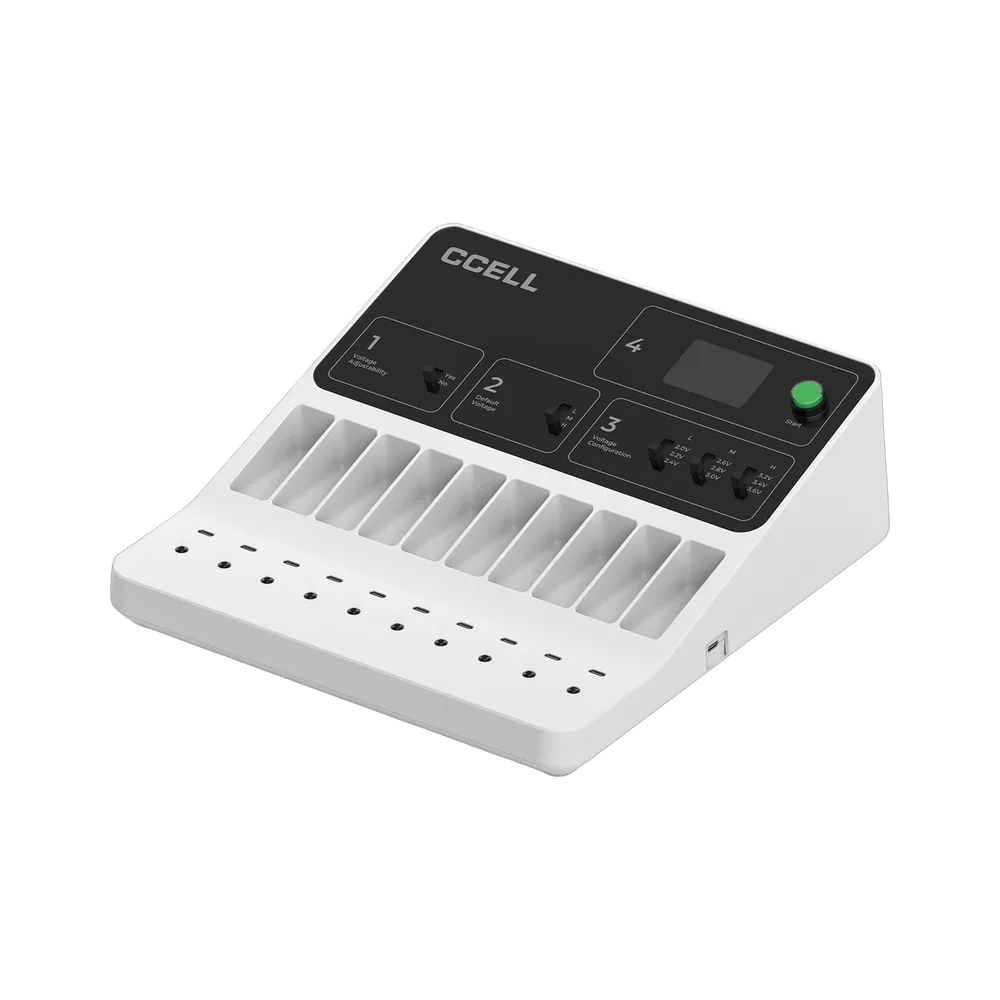
The CCELL Voltage Tuner is a bench programming station for licensed fillers who run the Voca Pro Max. It has ten USB-C ports, so up to ten devices can be programmed together, across nine voltages from 2V to 3.6V. The ABS housing measures 294 x 284 x 103 mm, and the set includes ten USB-C cables.
CCELL Voltage Tuner key specifications
Specification
Detail
Product type
Bench programming station for CCELL all-in-ones
Voltage range
2V to 3.6V, 9 voltages available
Ports
10 USB-C ports, programmes up to 10 devices at once
Compatibility
Applied to Voca Pro Max (Atom not in this pack)
Dimensions
294 x 284 x 103 mm (11.6 x 11.2 x 4.06 in)
Housing
ABS, resistant to impact and corrosion
Indicators
LED indicator lights
In the set
Tuner x 1, power cable x 1, USB-C connection cables x 10
Specifications per CCELL product data. The unit can be quoted on request.
What is the CCELL Voltage Tuner?
The CCELL Voltage Tuner is a bench-top programming station, not a battery and not a vape. It connects up to ten compatible all-in-one devices through ten USB-C ports and lets a filling business set their voltage presets in one pass. The range runs from 2V to 3.6V in nine selectable steps, and LED lights show the state of each connection.
The set includes the tuner, a power cable and ten USB-C connection cables, so a bench can be running as soon as the unit arrives. The tuner is listed as 294 x 284 x 103 mm with an ABS housing described as resistant to impact and corrosion.
Who needs a Voltage Tuner?
Fillers running the Voca Pro Max who want to change the default presets before units leave the bench.
Quality managers who qualify one voltage profile per oil lot and want it applied consistently.
Packing lines that handle batches, since ten ports cut programming time compared with one device at a time.
Not for retail customers or single-device users, who can use the presets as shipped.
Which devices is the Voltage Tuner compatible with?
The listing states that compatibility is applied to the CCELL Voca Pro Max and that the Atom is not in this pack. CCELL's notes on the CCELL Tank also refer to a separate tuner that can retune its three presets across 2.0V to 3.6V.
How does voltage programming change the draw?
Voltage across the heater sets power, and power sets temperature once oil, airflow and resistance come into play. Our voltage settings guide advises starting at the lowest supported step and raising it only if vapour is thin and flavour stays clean. A burnt note is a stop sign, not a cue to push higher.
The tuner does not change the heating technology. It changes the power delivered to the core CCELL has already built into the device, such as EVOMAX in the Voca Pro Max.
Which voltage should I programme for each oil?
There is no universal number, because every formulation behaves differently. Thin oils tend to want the lower steps, thicker oils may need more heat after a preheat, and delicate terpene-rich oils reward restraint. Test on a small batch, log the preset that tastes best, then programme the whole lot to that profile. Our oil types guide gives context. 3Devices Ltd sells hardware only, and the hardware is intended for CBD use only and not for minors.
Where does the tuner fit in a filling workflow?
Most filling businesses place the tuner between filling and final packing. Units are filled and capped, charged, then connected to the tuner in groups of up to ten. Programming a whole tray in one pass keeps profiles consistent and creates a natural checkpoint for quality control. Because a tuner changes power, not heating technology, it works best when you already know which oil goes in which device.
How do I use the Voltage Tuner?
Place the tuner on a stable bench and connect the power cable.
Plug each device into a USB-C port using the cables supplied. Up to ten can be connected at once.
Choose your target voltage within the 2V to 3.6V range.
Watch the LED indicator lights and follow the instructions supplied with the unit before unplugging any device.
Record the profile against the oil lot, then pack the units.
Tuner care and troubleshooting
A device is not recognised: reseat the cable, try another port and check the device model is on the compatibility list.
LED not lit: check the power cable and the wall socket first.
Cleaning: wipe the ABS case with a dry cloth and keep oil away from the ports.
Do I need a Voltage Tuner at all?
Not always. If you fill one oil type and are happy with the default presets, the tuner adds cost without adding value. It earns its place when you run several oils on identical hardware, when a customer wants a custom profile, or when a quality procedure calls for every unit to be set and logged. For simple ranges, a draw-only model such as the Voca Max needs no tuner at all.
Voltage Tuner pricing, minimum order and UK delivery
This is a trade item quoted on request, with pricing shown ex VAT on the page where available. The listing currently shows the unit as out of stock, so enquire about restock timing before you plan a production bench. UK delivery is offered on every order, with free shipping above the footer threshold. See the contact page to request a quote.
Is the Voltage Tuner authentic CCELL equipment?
It is supplied through 3Devices Ltd, an authorised UK distributor of authentic CCELL hardware. CCELL's own Voca Pro Max notes describe a separate CCELL Voltage Tuner as part of the system.
The listing states that the tuner is applied to the CCELL Voca Pro Max, and that the Atom is not included in this pack. CCELL's notes on the Tank also mention a separate tuner for its presets. Contact the trade team to confirm any other model before ordering.
How many devices can the Voltage Tuner programme at once?
It has ten USB-C ports and can programme up to ten devices at the same time. The set includes ten USB-C connection cables, so every port can be used straight away. This makes it far quicker than setting devices one by one on a busy filling bench.
What voltage range does the Voltage Tuner offer?
The range is 2V to 3.6V, with nine voltages available. The Voca Pro Max ships with 2.4V, 2.8V and 3.2V presets, and the tuner lets you reprogramme them. Always test a new profile on your own oil before applying it to a full batch.
What is in the box with the Voltage Tuner?
The set lists one tuner, one power cable and ten USB-C connection cables. The housing is ABS, described as resistant to impact and corrosion, and LED indicator lights show status. Dimensions are 294 x 284 x 103 mm, so allow bench space of roughly a large book.
Which voltage should I choose for distillate, live resin or rosin?
Our voltage guide advises starting at the lowest supported step and raising it only if vapour is thin while flavour stays clean. Live extracts generally suit the low end, while distillate can sit a little higher. Qualify the setting on your actual oil lot, because formulations vary.
Is the Voltage Tuner a vape or a battery?
No. It is a bench programming station for filling businesses. It does not hold oil, produce vapour or replace a 510 battery. It sets voltage presets on compatible all-in-one devices, and it is intended for trade use, not for sale to minors.
How much does the Voltage Tuner cost and is there a minimum order?
The tuner is quoted on request, with pricing shown ex VAT where listed. Wholesale is by enquiry, and free sample trays are not offered. The page currently shows it as out of stock, so ask the trade team for restock timing and a quote.
Do you deliver the Voltage Tuner across the UK?
Yes. UK delivery is offered on every order, with free shipping above the footer threshold. Because the unit is currently listed as out of stock, confirm expected availability with the trade team before you build a production schedule around it.
Is the Voltage Tuner authentic CCELL, and what is it made from?
It is supplied by 3Devices Ltd, an authorised UK distributor of CCELL hardware. The housing is ABS plastic, described on the listing as resistant to impact and corrosion. The page gives no further material detail, so ask the trade team if you need it for an equipment register.
My device is not responding on the tuner. What should I check?
Reseat the USB-C cable, try a different port and confirm the device model is on the compatibility list, since the listing names the Voca Pro Max. Check that the power cable is connected and the LED lights are on. If the problem continues, contact the trade team.